Cubase 15 has introduced a revamped Expression Map system, significantly improving MIDI editing workflows for sound libraries that involve complex articulations.
However, it appears that some unexpected bugs have surfaced. I recently struggled with one such issue myself, but fortunately, I discovered a surprising workaround.
In this article, I will explain this unexpected bug hidden behind a convenient new feature and provide a simple solution. If you use the Key Editor’s controller lanes to display and edit articulation groups in a collapsed state, this troubleshooting method should be very helpful.
The Bug and its Solution
In short, the situation is as follows:
Symptoms:
- When using multiple groups and keeping them collapsed, creating new articulations with the Draw (Pencil) tool no longer functions correctly.
Solution:
- Keep the “Sound Slot Lane” hidden.
Detailed Explanation of the Bug and Workaround
This specific bug occurs when multiple groups are used and kept in their collapsed state.
Please refer to the image below.
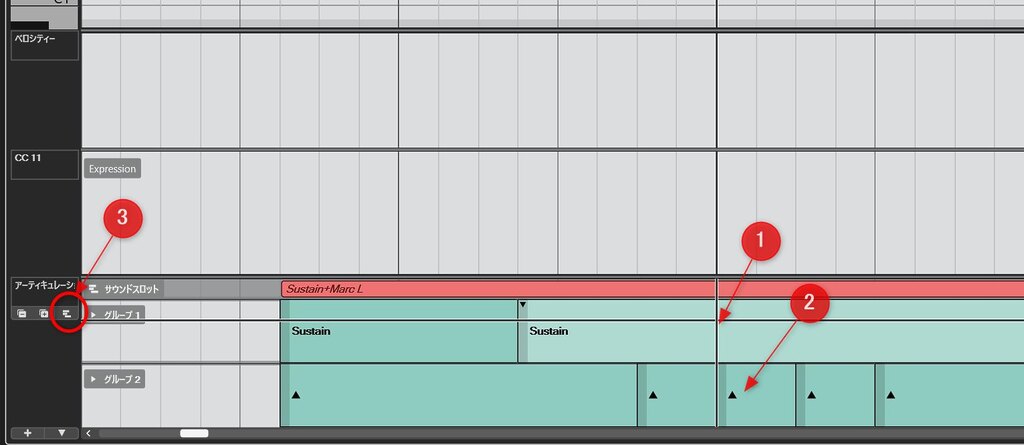
Suppose you click with the Pencil tool at position “1” to input a new articulation instruction within this specific setup.
Normally, the articulation should be created in the lane for Group 1 (the upper group). However, it is incorrectly created at position “2” in Group 2 (the lower group). Once this state is triggered, you cannot create new articulation events in Group 1 unless you expand Group 1 again.
This significantly hinders workflow efficiency, making it a serious issue for users who rely on the grouping feature.
As mentioned at the beginning, however, you can avoid this behavior by hiding the Sound Slot Lane.
By clicking the icon labeled “3” to hide the Sound Slot Lane at the top of the controller lanes, you will once again be able to input articulation instructions at the intended positions within any group without issues.
The Benefits of the “Group Collapse” Feature
In the Cubase 15 Expression Map, it is now possible to collapse articulations by group, allowing for a much more compact display and editing environment. Even when collapsed, you can still select specific articulations from a menu.
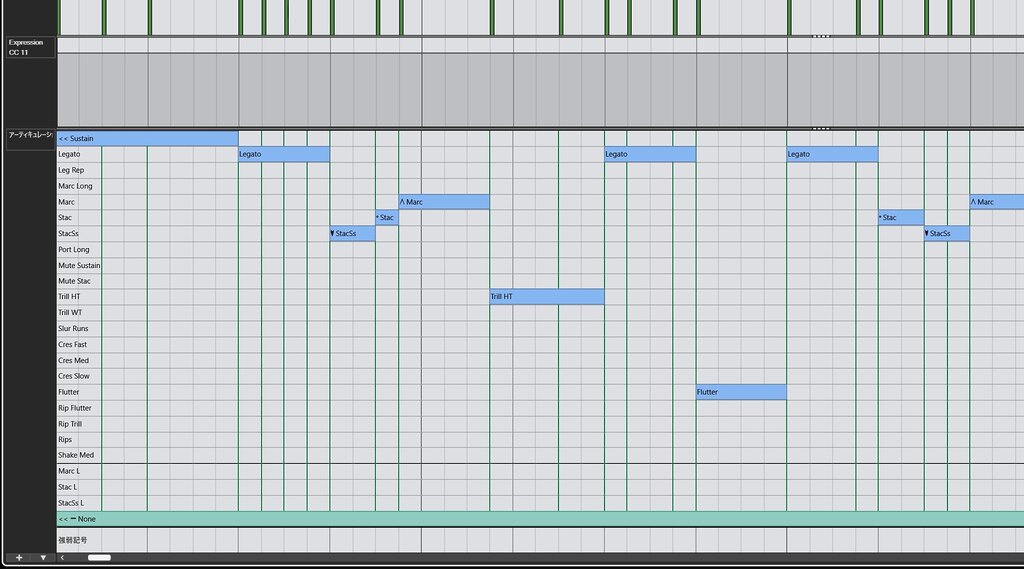
In previous versions, as shown in the image below, these lanes required a large amount of vertical space, often cluttering the note editing area.
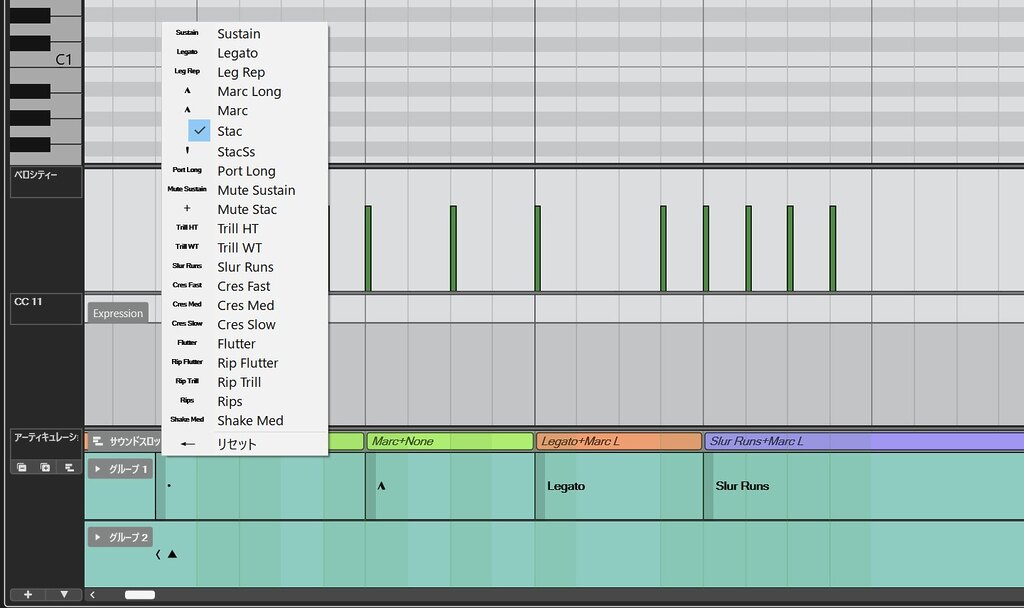
In the revamped Cubase 15, you can collapse each group (as shown below), achieving superior space efficiency and visual clarity.
In this state, you can select articulations by clicking the left edge of the instruction on the lane to open a drop-down menu. Alternatively, you can use the mouse wheel over the left edge to cycle through articulations without even opening the menu.
Final Thoughts
In this case, a specific display setting in the editor was affecting the software’s behavior, but fortunately, it can be bypassed by the user.
While this bug will likely be addressed in a future update, it is the kind of issue that is difficult to troubleshoot on your own. I decided to write this article because I discovered the cause by chance while comparing a project that worked correctly with one that didn’t (I have already reported this on the official Steinberg forums).
I hope this information helps other users who are facing the same frustration.
Related Articles